Low ink or low toner message
The printer estimates that a cartridge or toner supply is low.
What to check
Learn how ink cartridges, toner, paper trays, paper size, paper type, print quality, and common supply messages affect printer output.
Topic
Includes
Common Issue
Purpose
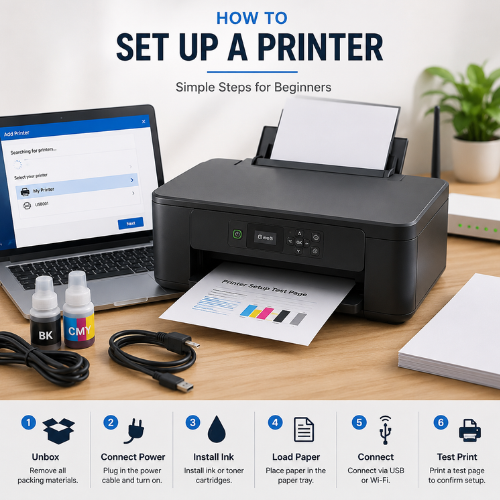
Printers depend on supplies such as ink, toner, paper, trays, rollers, and paper-size settings. If one of these does not match the printer’s expectation, the printer may show a warning or produce poor output.
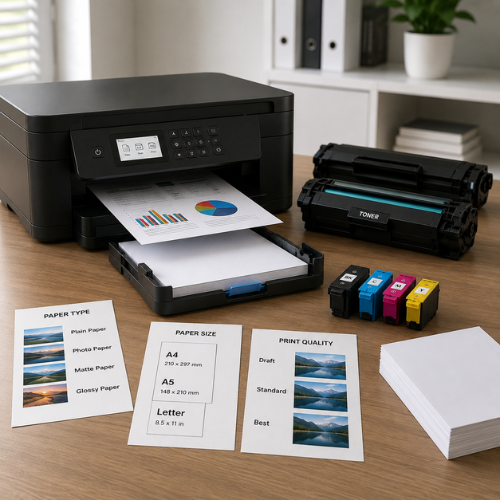
Inkjet printers commonly use liquid ink cartridges. Laser printers commonly use toner powder. Both systems can print documents, but they handle color, drying, page volume, and maintenance differently.
Paper also matters. The paper size, paper type, tray alignment, thickness, and printer settings can affect feeding, margins, print clarity, and paper mismatch messages.
The supply type depends on the printer technology. Inkjet printers usually use cartridges with liquid ink. Laser printers usually use toner cartridges with fine powder.
Ink cartridges contain liquid ink. They are common in home inkjet printers and are often used for documents, color pages, and photos depending on the printer model.
Toner cartridges contain fine powder used by laser printers. Toner is fused to paper using heat inside the printer, which is why laser printers are often used for high-volume text printing.
A4, Letter, Legal, photo sizes, and envelopes must match the document and printer setting.
Plain, photo, glossy, matte, labels, or envelopes may require different printer settings.
The tray holds paper and uses guides to keep sheets aligned during feeding.
Thicker paper may need a supported tray or specific media setting.
Side guides help keep the paper straight and reduce skewed feeding.
Rollers pull paper into the printer. Dust or wear can affect feeding.
A mismatch can appear when loaded paper differs from the selected size or type.
Some printers have printable-area limits that affect border and layout.
Supplies must match the printer type and supported paper settings.
Paper must be loaded neatly and aligned with tray guides.
These messages can differ by brand and model. Always compare the message with the printer display, printer app, Windows printer settings, or manufacturer documentation.
The printer estimates that a cartridge or toner supply is low.
What to check
The cartridge may not be seated correctly, protective tape may remain, or the cartridge may not match the printer.
What to check
This may relate to empty supplies, dried ink, toner distribution, clogged nozzles, or incorrect print settings.
What to check
Lines can come from printhead/nozzle issues, toner/drum issues, dirty glass during copies, or paper handling.
What to check
The selected paper size or type may not match what is loaded in the tray.
What to check
Paper may be stuck, curled, overloaded, misaligned, or unsupported for the tray.
What to check
Quality settings, toner density, paper type, or draft mode can affect output.
What to check
The printer may be trying to pull paper from a tray that is empty or not intended for the document.
What to check
HP Support
Brother Support
Canon Manuals
Epson Support
Microsoft Support
Microsoft Support
No. Ink is liquid and is commonly used in inkjet printers. Toner is powder and is commonly used in laser printers.
The cartridge may not be seated correctly, may not match the model, or protective packaging may still be attached.
Paper mismatch can appear when printer settings do not match the size or type loaded in the tray.
Yes. Photo paper, plain paper, labels, envelopes, and thicker sheets may require different settings.
Faded prints can relate to low supply level, draft mode, wrong paper type, clogged ink nozzles, or toner distribution.
No. This page is educational content only and does not provide phone support, remote access, repair service, installation service, or paid troubleshooting.