Document stays pending
The job is waiting but has not moved forward to the printer.
What to check
Learn how print jobs wait, why documents may stay pending, what paused printing means, and how print queue issues can make a printer appear stuck or offline.
Topic
Means
Common Issue
Purpose
A print queue is the temporary list where print jobs wait before they are sent to the printer. When a user clicks print, the document does not always go directly to paper. It first enters a queue where the system organizes the job and sends it to the printer in order.
The queue helps manage multiple documents, paused printers, offline printers, and delayed print jobs. If one job gets stuck, later jobs may wait behind it even if the printer looks ready.
This page explains print queue behavior for learning only. It is not a repair service, phone support page, remote assistance page, or paid troubleshooting service.
User clicks print from an app.
The document enters the waiting list.
Driver prepares printer instructions.
Printer receives the job when ready.
The document prints on paper.
Pending jobs may appear in a list before the printer receives them. A stuck job can block later jobs.
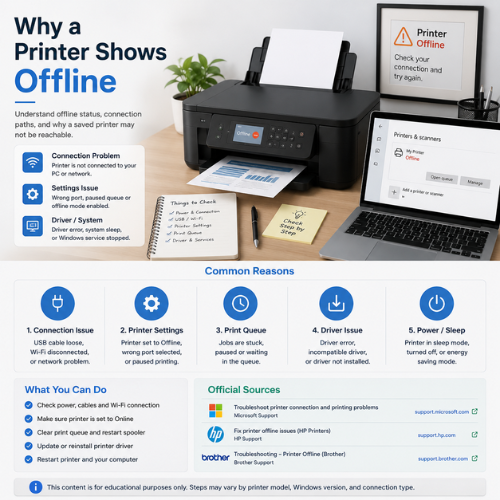
If the printer is offline or paused, documents may stay in the queue instead of printing.
These are common learning notes about queue behavior. Exact labels can differ by Windows version, printer brand, connection method, and printer software.
The job is waiting but has not moved forward to the printer.
What to check
Paused printing can stop jobs from moving even when the printer is connected.
What to check
This setting can stop Windows from sending jobs to the printer normally.
What to check
A failed or damaged job can stay at the top and block later documents.
What to check
The document may be sent to another saved printer profile instead of the real printer.
What to check
The queue may receive the job, but the driver layer may not process it correctly.
What to check
Wi-Fi printers may delay jobs when network discovery, signal, or router communication is weak.
What to check
The print spooler is the Windows service that manages print jobs. If it has a problem, queues may not behave normally.
What to check
This flow is written for learning. Labels may be slightly different depending on Windows version, printer model, and manufacturer software.
Go to the printer area where saved printers are listed.
Choose the actual printer you want to use, not an old duplicate profile.
View documents waiting, paused, or pending for that printer.
A failed old job can prevent new jobs from moving forward.
Remove unnecessary pending jobs before sending a new document.
Make sure the queue is not paused and not set to use printer offline.
After the queue is clear, test with one simple document or test page.
Understanding these terms makes it easier to read printer settings without guessing.
The document is waiting before being sent to the printer.
The queue or job has been stopped until it is resumed.
The job is currently being processed by the printer.
The job could not continue because something interrupted printing.
The computer cannot currently communicate with the printer.
The Windows service that manages print jobs and queues.
The printer Windows may choose automatically for print jobs.
Removes a waiting document from the print queue.
Microsoft Support
Microsoft Support
Microsoft Support
Microsoft Learn
HP Support
Brother Support
A print queue is the waiting list where print jobs are stored before they are sent to the printer.
Documents may stay pending if the printer is offline, paused, busy, disconnected, or blocked by an older stuck job.
Yes. A failed job at the top of the queue can prevent later documents from printing.
Paused printing means the queue is stopped and jobs will not continue until printing is resumed.
The print spooler is a Windows service that manages print jobs and sends them to the printer.
Yes. Queue problems and offline settings can make the printer appear unresponsive even when it is powered on.
No. Sending the same job many times can create duplicate queue entries and make the queue harder to understand.
No. This page is educational content only and does not provide phone support, remote access, repair service, installation service, or paid troubleshooting.