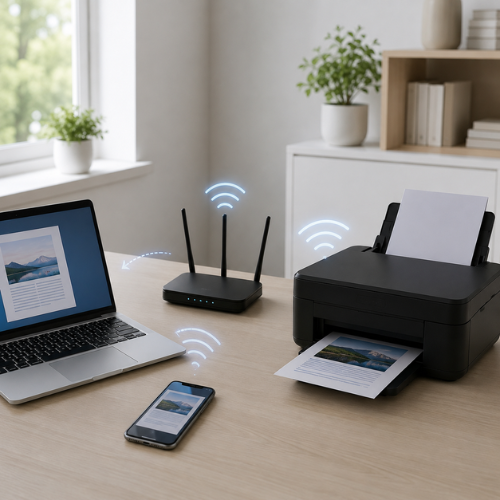
A Wi-Fi printer is a printer that connects to a wireless network instead of relying only on a direct USB cable. In most homes and offices, the printer connects to the router, and the computer or phone sends print jobs through that same local network.
How Wi-Fi printers usually connect
A wireless printer has a built-in wireless adapter. During setup, the printer joins a Wi-Fi network using the network name and password. After the printer joins the network, the router gives it a local network address. This address helps other devices find the printer.
Your laptop, desktop, phone, or tablet usually needs to be connected to the same local network. If the device is on another Wi-Fi network, a guest network, or a separated router band, the printer may not appear during printer discovery.
How a Wi-Fi print job moves
When you click print, the document goes through several layers before the page prints. The printer driver prepares the document, the computer sends the job through the network, and the router helps deliver it to the printer.
Device
Computer or phone sends the print request.
Driver
Printer profile prepares print instructions.
Router
Router moves the job across the local network.
Printer
Printer receives and processes the job.
Output
The page prints from the selected tray.
Why the same Wi-Fi network matters
Most wireless printers are discovered on the local network. That means the printer and the device sending the job usually need to be connected to the same router or same local network. If your laptop is connected to a guest network while the printer is connected to a main network, they may not see each other.
Same network
Printer and computer are connected to the same local network, so discovery is usually easier.
Guest network
Guest networks may isolate devices from each other, which can stop printer discovery.
Common Wi-Fi printer issues users may notice
Wireless printing problems are often related to network visibility, router settings, printer profiles, signal strength, or print queue behavior.
Printer not found
The printer may not be connected to the same network as the computer or phone.
What to understand
Check the Wi-Fi name on both the printer and the device.
Printer shows offline
The printer profile may exist, but the current network path may not respond.
What to understand
Restart the printer and confirm it is connected to Wi-Fi.
Weak signal near printer
Walls, distance, shelves, or router placement can reduce wireless stability.
What to understand
Move the printer closer to the router during setup.
Old network saved
The printer may remember an older Wi-Fi name or password after router changes.
What to understand
Reconnect the printer to the current Wi-Fi network.
Jobs stay pending
The printer may be discovered, but the queue or driver profile may not be processing jobs.
What to understand
Open the print queue and cancel old pending jobs.
Driver/profile missing
Wireless printers still need a driver or printer profile to receive correct print instructions.
What to understand
Use Windows printer settings or the manufacturer’s official source.
Wireless printer terms explained
SSID
The Wi-Fi network name shown in available networks.
Router
The device that helps local devices communicate and access the internet.
IP Address
A local network address assigned to the printer by the router.
Printer Profile
The saved printer entry and driver configuration on the computer.
Guest Network
A separate network that may block device discovery.
Print Queue
The waiting list where wireless print jobs stay before printing.